BitSpeed Inspect Case Study Traces a 180 ms Slowdown to First Byte Wait
Here’s the situation. A request feels slow. Someone changes something, and it feels faster. Was it the connection, the server’s first response, or reading the body? A single total won’t tell you, and a second total won’t either.
This case uses the saved recordings in the BitSpeed repository’s examples folder. They were made with the released Inspect binary against a local test server on loopback. The “before” server held its response headers for 200 ms. The “after” server held them for 20 ms. Everything else stayed the same: same URL path, same request settings, three fresh-connection samples each.
Recording and explaining
Three commands do the work:
bitspeed-inspect record --samples=3 http://127.0.0.1:36645/headers > before.json
bitspeed-inspect explain before.json
bitspeed-inspect compare before.json after.json
The explanation of the first recording breaks each sample into intervals and says which one dominated. In sample 0, TCP connect took 0.36 ms, connection setup 0.55 ms, first-byte wait 201.15 ms and the response read 0.23 ms. Inspect’s verdict for that hop: first-byte waiting was the largest of the compared intervals.
Two things it refused to do are worth noticing. DNS resolution and TLS handshake show as unavailable, because a loopback IP over plain HTTP never produced those events. They aren’t shown as zero. And the first-byte line carries a limit: client waiting includes more than server processing, so it doesn’t identify a server-side cause. Every number links back to the recorded event it came from, so you can check it.
Comparing
The comparison puts medians and observed ranges side by side, phase by phase.
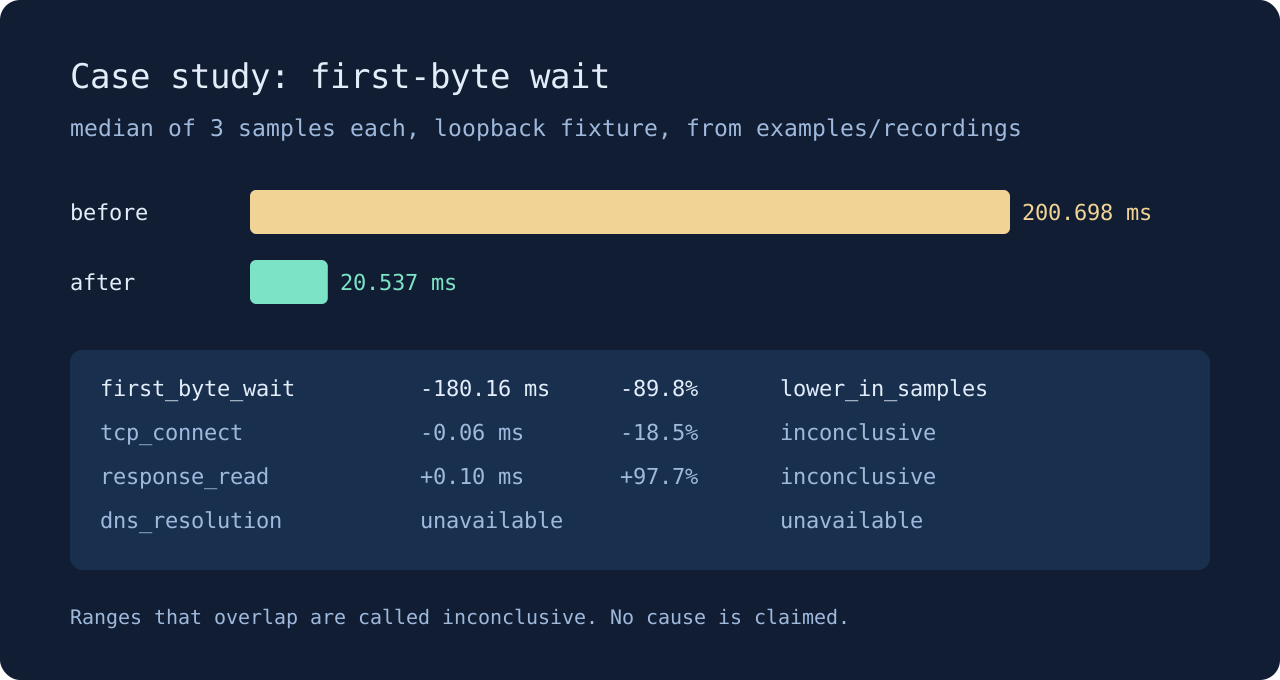
First-byte wait went from a median of 200.698 ms to 20.537 ms. That’s 180.16 ms lower, about 90 percent. The before range was 200.67 to 201.15 ms and the after range was 20.53 to 20.99 ms. No overlap, so Inspect labels it lower in these samples.
TCP connect dropped 0.06 ms and response read rose 0.10 ms. Those look like big percentages, minus 18.5 and plus 97.7. Inspect calls both inconclusive, because the before and after ranges overlap. Three samples on a busy laptop wobble by that much on their own.
What this tells you
The change that mattered happened before the first response byte. The connection and the body read didn’t move in any way the samples can support. That points you at whatever runs before the server starts answering, which here was a deliberate delay.
It doesn’t tell you the server got faster in general, and Inspect says so in its closing limits. Medians and ranges describe these samples only. Matching payload sizes don’t prove identical responses. On a real service you’d collect more samples, the default is ten, and keep the request settings fixed between runs.
You can rerun this case yourself with examples/demo.py and the Inspect download. Your timings will differ. The shape of the answer shouldn’t.